
Attack-Based vs Data-Based Threat Hunting: Two Ways to Start
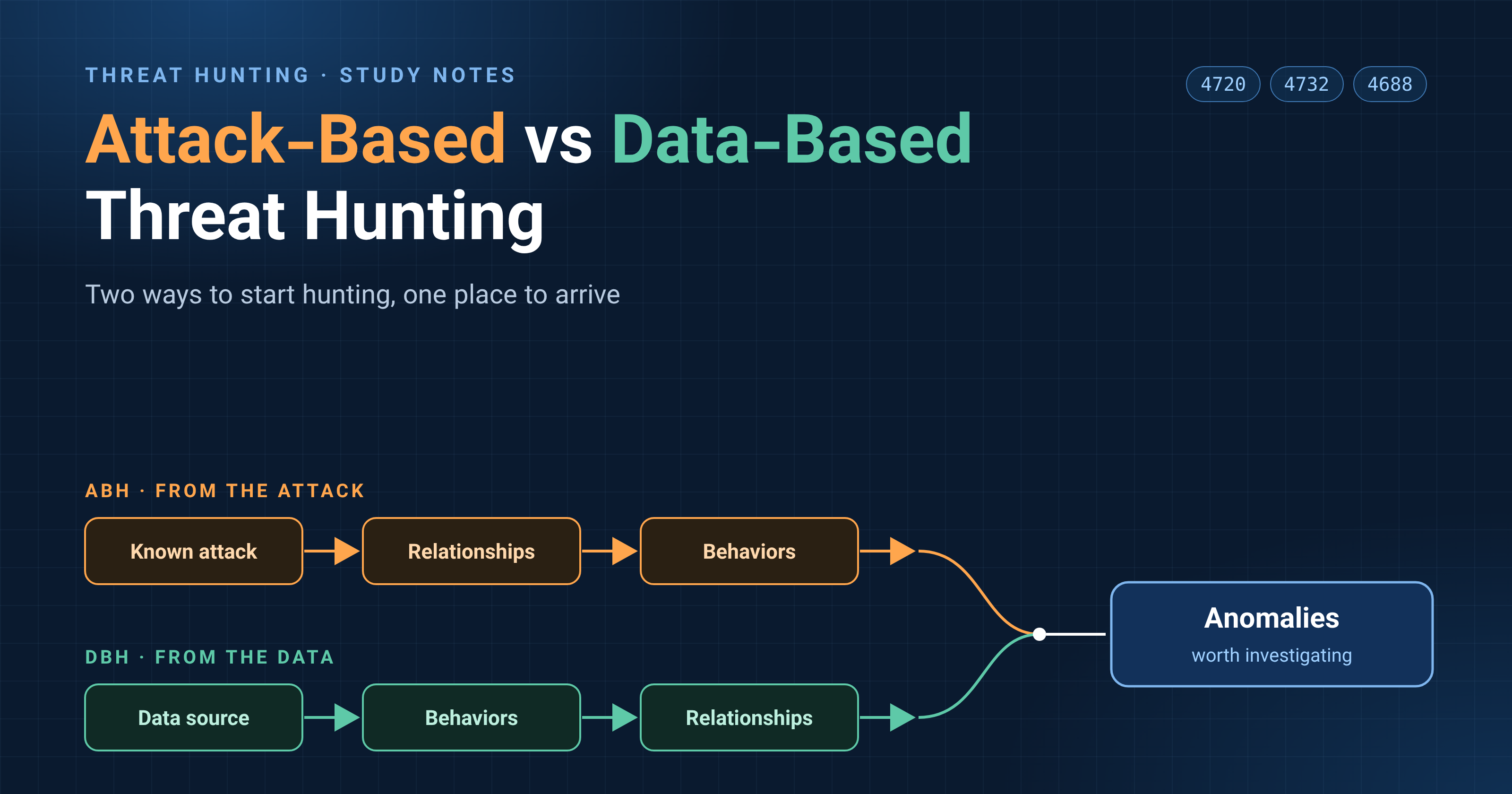
Most security tools wait for an alert. Threat hunting works the other way around: you go looking for an attacker who may have slipped past automated detection. The two lessons I studied introduce two mental models for doing that, Attack-Based Hunting (ABH) and Data-Based Hunting (DBH). They are two directions that lead to the same place.
The Idea Behind Both: Attacks Are Relationships
An attack creates an unwanted relationship between an attacker and a user or system. A host talking to another host is a relationship. A user downloading a file from a server is a relationship. A tool being executed on a host is a relationship.
Each relationship produces observable behavior, and each behavior leaves evidence: logs, packet captures, files on disk. Hunting means finding the behaviors that reveal relationships that should not exist.
Attack-Based Hunting: Start from an Attack
In ABH you pick a specific attack and ask: has this happened in my network?
The example in the lesson comes from US-CERT alert TA18-074A, which describes Russian government activity against energy and other critical infrastructure. After compromising a host, the attackers used scripts to create local administrator accounts named to look like legitimate backup accounts. In MITRE ATT&CK this is Create Account (T1136), a Persistence technique.
To make that happen, a chain of events must occur:
- The attacker gains unauthorized access to a system.
- A user-management tool is executed on the host.
- A new local account is created.
Creating accounts is normal in most networks, so alerting on every new account would be noise. Instead, you hunt for anomalies. For each one, ABH asks three questions: What am I looking for? Where will I find it? How do I manipulate the data to see it?
| Anomaly | Windows event | Idea |
|---|---|---|
| Name does not follow the naming convention | 4720 (account created) | Search account creations and read the usernames |
| Unexpected or insecure properties (e.g. password never expires) | 4738 (account changed) | Only look at 4738 right after a 4720 |
| Added to a privileged group immediately | 4732 (member added to group) | Correlate with 4720 within about a minute |
| Created at an unusual time for the creating user | 4720 + 4624/4634 | Compare with that user's normal hours |
| Created by someone who has never created an account | 4720 | Aggregate by creating user, check the least common |
| Created from a system that has never created one | 4720 | Aggregate by source system, check the least common |
The lesson stresses that this list is not complete. Part of the exercise is thinking of more anomalies yourself.
Data-Based Hunting: Start from the Data
DBH flips the direction. You pick a data source and ask: does anything in here look malicious? The example is Windows Event ID 4688, which records that a new process was created.
The four most useful fields are:
- New Process Name: the file that was executed
- Creator Process: the parent that started it
- Account Name: who it ran as
- Timestamp: when it ran
A log entry only represents what happened. A process named chrome.exe is not necessarily Chrome, so findings are leads to investigate, not proof.
Five hunting techniques came out of these fields:
- Unusual process names: generic names like
update.exe, look-alikes of legitimate processes, random-looking names, and rare processes. Aggregate by process name and sort by least common. - Unusual parent-child pairs: Explorer starting Chrome is normal, an Office application starting PowerShell is not. Focus on commonly exploited parents such as Office, browsers, and
cmd.exe. - Unusual paths: a program running from a location it normally does not. The lesson's example was Windows Defender running from a user's profile folder instead of Program Files.
- Unusual times: a process or user active outside normal hours. Expect false positives from scheduled tasks and backups.
- A process this user has never run before: best applied to sensitive users and administrators, not the whole network.
ABH vs DBH
| ABH | DBH | |
|---|---|---|
| Starting point | A specific attack | A specific data source |
| Main question | Did this attack happen here? | Does anything in this data look malicious? |
| Knowledge needed | Deep knowledge of one attack | Knowledge of many attacks and of the data source |
| For beginners | More linear, easier to start | Needs more experience, but has quick wins |
ABH is the easier place to begin. Practicing it builds data skills that help DBH too, and a DBH finding can later become an ABH hunt or an automated detection.
The Catch: Logs Must Leave the Machine
Something I asked my instructor about: if an attacker gets administrative access, they can clear the logs on that host, not just 4688. His answer was that without a SIEM, local logs lose much of their value, and that getting the logs to the SIEM completely and reliably is a separate problem of its own.
A few related points I noted for myself:
- Clearing a Windows log creates its own event (1102 for Security, 104 for System), but only useful if it was forwarded before the logs were wiped.
- A host that suddenly stops sending logs is a signal too.
- Process creation auditing, including the command line, has to be enabled to get useful 4688 events at all.
What I Want to Try Next
- Create test accounts in a Windows VM and look at events 4720, 4738 and 4732 in Event Viewer.
- Enable process creation auditing and compare 4688 with Sysmon event 1.
- Find the Linux equivalents with
auditdand test them in a Linux VM.
I will write a follow-up once I have tried them.
References
- MITRE ATT&CK: Create Account (T1136)
- US-CERT Alert TA18-074A: Russian Government Cyber Activity Targeting Energy and Other Critical Infrastructure Sectors
About the author
- Computer Engineering student sharing my journey through Linux, Networking, and Systems Administration.
Comments
Join the discussionNo comments yet. Be the first to comment.